
Vidu Q4 image to video
Upload one picture and Vidu Q4 Preview turns it into a moving shot: your image becomes the first frame, then the subject moves, speaks and reacts while the camera follows. Leave the prompt empty and the model plans the motion itself, or describe exactly what should happen.
Length
05sec
Resolution
Interrogation
Made on Slatecraft, Image to Video · 720p · 8 s, with sound
Image
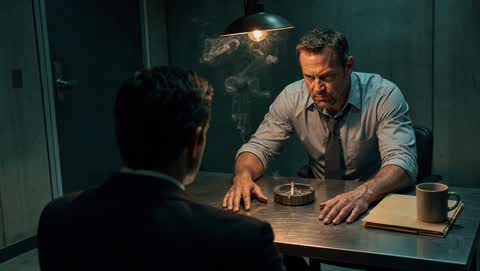 First frame
INT. INTERROGATION ROOM - NIGHT
The detective slams both hands on the table and the swinging lamp throws moving shadows across his face. He shouts: "Where were you that night?!" The camera pushes in fast to an extreme close-up of his eyes. The suspect flinches. The bang of the table, the creak of the swinging lamp, heavy breathing.
How it works
- 1
Pick the first frame
A JPG, PNG or WebP up to 20 MB. Frame it the way the shot should open: the video keeps its shape, so a 9:16 photo gives a vertical video.
- 2
Say what happens
One action, a line of dialogue in quotes, and a camera move. Or leave it empty and let Vidu write the motion.
- 3
Choose length and quality
3 to 16 seconds, 540p to 4K, with dialogue and sound effects. The exact credit cost is on the Generate button.
Image to video prompts that work
Start from the photo, not from scratch
The image already sets the subject, clothes and light. Spend the prompt on what changes: movement, expression, speech and camera.
He looks up from the newspaper, raises an eyebrow and says “You’re not serious.” Slow push-in.
One action per short clip
For 5–8 seconds, one clear action reads best. Use 12–16 seconds for a small sequence: a turn, a line, a reaction.
She walks toward the window, stops, and turns back to the camera with a small smile. Handheld, warm afternoon light.
Products and packshots
Describe light and camera rather than the product itself, so the label and shape stay true to your photo.
Light sweeps slowly across the bottle as the camera orbits left; soft reflections on the glass, quiet ambient hum.
Artwork and illustrations
Ask the model to keep the style and add small, natural motion: wind, drifting clouds, blinking, breathing.
Keep the painted style. Wind moves through the grass and her hair, clouds drift, she blinks slowly.
Vidu Q4 image to video FAQ
Exactly one, and it becomes the first frame. To combine several characters, outfits or places in one shot, use Reference to Video, which takes up to 12 images.
No. With an empty prompt Vidu Q4 writes its own description of the motion from your image. If you type a prompt, it is used as you wrote it.
It follows your image. Crop the photo to 16:9, 9:16 or 1:1 before uploading to get that shape. Images more elongated than 4:1 are not accepted.
Yes. Keep Sound on and write the line in quotes, e.g. She says “Happy birthday, Mom.” Vidu Q4 generates the voice, lip movement and sound effects with the picture.
Photos of people who have not agreed to it, anything sexual, and images you don’t have the rights to. Moderated requests are refunded automatically, but repeated violations close the account.