
Vidu Q4 reference to video
Give Vidu Q4 Preview the cast and the props (up to 12 images of characters, outfits, products and places, plus up to 3 voice clips) and describe the scene. The model builds a new shot around them, keeps every character recognizable across camera cuts, and matches their voices.
Characters, outfits, products or places. In the prompt, @1 is the first image, @2 the second, and so on.
MP3, 3–12 seconds each. Keeps a character's voice consistent.
Length
05sec
Resolution
Aspect ratio
Sound
The Duel
Made on Slatecraft, Reference to Video · 720p · 10 s, with sound
Reference images
 @1
@1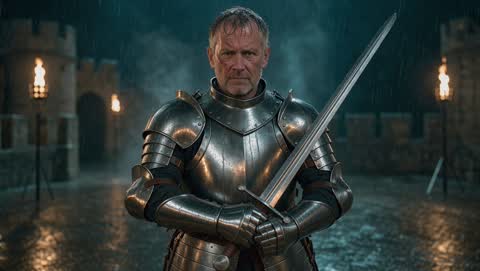 @2
@2 @3
@3
EXT. STONE BRIDGE - RAIN
In @3, @1 and @2 face each other in the middle of the bridge in the pouring rain, lanterns swaying. @2 raises his sword and says: "Only one of us leaves this bridge." @1 draws his katana. They charge and their blades clash in a burst of sparks. Cut to a slow-motion close-up of the crossed blades with rain bouncing off the steel. Thunder, rain, the ring of steel on steel.
How it works
- 1
Add your references
1 to 12 images, one subject each works best: a face, an outfit, a product, a location. They are numbered @1, @2… in the order you add them.
- 2
Write the scene
Use the numbers in the prompt: “@1 hands @2 the letter from @3.” Add up to three MP3 voice clips (3–12 s) to keep voices consistent.
- 3
Frame and generate
Pick 16:9, 9:16, 1:1, 4:3 or 3:4, a length from 3 to 16 seconds and a resolution up to 4K.
Reference to video prompts that work
Name every reference
Each image should appear in the prompt by its number. An image you never mention may be ignored or blended into the scene.
@1 sits on the sofa from @3, reading the book from @2. She looks up and laughs. Slow push-in, evening lamp light.
Short drama: write the beats
Vidu Q4 can cut between angles on its own. Give it the beats in order (action, line, reaction) and it plans the coverage.
@1 and @2 face each other in a dark corridor. @1 says “You knew all along.” Cut to @2, silent, then a close-up of @1.
Ads: product plus presenter
Put the presenter in one image and the product in another, then describe how the product is shown.
@1 holds the phone from @2 up to the camera and says “Two days of battery, finally.” Bright studio, quick zoom on the screen.
Keep a voice across videos
Reuse the same MP3 for a character in every clip of a series. Clips of 5–10 seconds of clean speech work best.
Vidu Q4 reference to video FAQ
From 1 to 12 images per video, plus up to 3 reference sounds. JPG, PNG or WebP up to 20 MB each.
By its number: @1 is the first image you added, @2 the second, and so on. The numbers are shown on each thumbnail in the editor.
They guide how characters sound: tone, accent and delivery. Each clip must be an MP3 of 3 to 12 seconds. Keep Sound on so the video is generated with dialogue.
No. Both modes cost the same per second at each resolution; images and voice clips are free to add.
Only with their permission, and never to make sexual, hateful or deceptive content about them. Public figures are often blocked by moderation; blocked videos are refunded.